

Billing
How are orders billed?
The last action before an order is complete is “Create Invoice.” This uses the information in the order record to create an invoice on Stripe. When invoices are created, Stripe will take care of emailing the customer a copy of the invoice, along with a link they can use to pay.
Supported Payment Methods
The link currently supports:
- Cards
- ACH
- CashApp
Confirming Payment
When an invoiced is paid by the customer, Stripe will communicate with our system, and change the status to Paid automagically.
For order paid in cash or check, you must manually update the invoice on Stripe. Locate the invoice id. It can be found in the admin site under the billing tab of an order.
Go to https://dashboard.stripe.com/invoices/
Use the top search bar to look for the invoice id. Just paste it in. Once you found the invoice, click “Change invoice status” in the dropdown “More.” See below
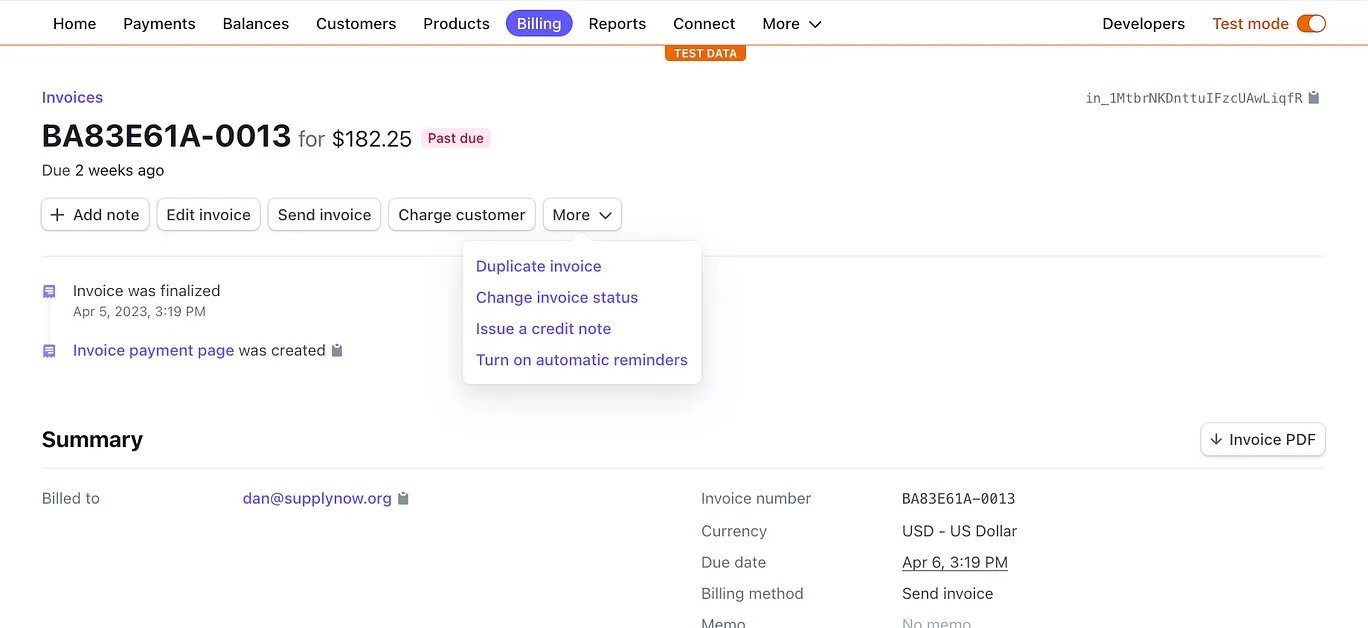
Be sure to enter the check number or other identifiable information in the text box that pops up
Billing Restaurant Depot
We don’t invoice customers for these orders, so once they are marked as completed these order are technically done from a dispatching perspective. We bill Restaurant Depot directly for our net revenues from these orders, and reconciliation is our responsibility.
Payout Reports
We receive a varienty of payout reports from Restaurant Depot. These are confirmations of payment that include all adjustments to payment due to Out of Stock, Partial Stock, or Cancellation.
We must try our best to keep our system as updated as possible based on the reports given to us by Depot’s system.
Subscription & Retainers
Some of our users pay a retainer fee to use the service. We collect these retainer fees through Stripe using their “Subscription” features. To find out more, go to Stripe’s Subscriptions documentation